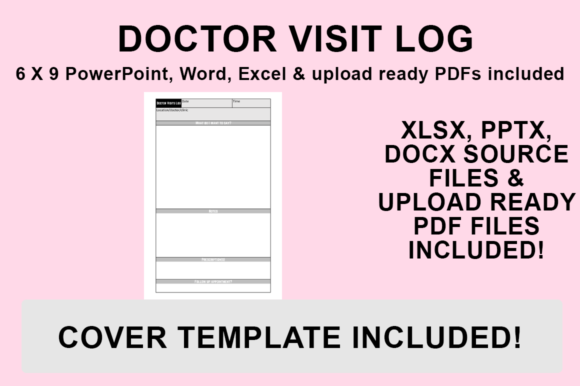
KDP Interior - Doctor Visit Log: Customizable Templates for Publishers and Personal Health Tracking
Creating a successful low-content or medium-content book on Amazon KDP requires more than just uploading a generic PDF. It demands a strategic approach to interior design, usability, and niche specificity. The KDP Interior - Doctor Visit Log serves as a foundational asset for publishers targeting the health, wellness, and senior care markets. Unlike static templates, this resource provides editable source files in PowerPoint, Word, and Excel, alongside a print-ready PDF. This flexibility allows creators to tailor the product to specific sub-niches, ensuring the final publication meets precise market needs while maintaining professional formatting standards.
For entrepreneurs and freelancers, this log is not merely a tracking tool; it is a scalable digital product component. Whether you are building a comprehensive medical journal series, creating a caregiver resource guide, or designing a personal health tracker for private use, the ability to modify the core structure is essential. The inclusion of no-bleed, 6″x9″ formatted files ensures compatibility with KDP’s printing specifications right out of the box, reducing technical friction during the publishing workflow.
Strategic Integration into Publishing Workflows
The KDP Interior - Doctor Visit Log fits into the broader content creation ecosystem at multiple stages. Understanding where and how to deploy this asset can streamline production and enhance product value.
Pre-Publication Market Validation
Before committing to a full print run or marketing campaign, use the editable Word or Excel files to create test variations. Publishers can alter headers, add specific symptom trackers, or adjust column widths to target different demographics. For example, a version designed for pediatric care will differ significantly from one intended for geriatric management. By customizing the template early, you can create distinct listings that address specific user pain points rather than offering a one-size-fits-all solution that often underperforms in search results.
During Product Development and Bundling
This log functions effectively as a standalone product or as a value-add component within a larger bundle. When combined with other health-related PDFs, such as medication trackers or insurance claim logs, it increases the perceived value of the offering. Because the files are designed without bleed and sized to 6″x9″, they integrate seamlessly with other standard trim size interiors. This modularity allows creators to mix and match assets to build comprehensive health journals without worrying about margin errors or resizing issues during the compilation phase.
Post-Publication Iteration
Market trends shift, and customer feedback often reveals missing features. Having access to the original PowerPoint and Excel source files means you never have to rebuild the interior from scratch. If reviews indicate that users need more space for doctor notes or an additional field for insurance codes, you can update the master file and re-upload a revised edition. This agility is critical for long-term success in the KDP marketplace, where maintaining relevance requires continuous optimization.
Customization and Brand Differentiation
Saturation is a common challenge in the low-content book space. To stand out, your KDP Interior - Doctor Visit Log must reflect a unique brand identity. The provided source files empower you to move beyond default aesthetics and implement custom styling that resonates with your target audience.
- Typography Selection: Choose fonts that prioritize readability for older adults or those with visual impairments. Sans-serif fonts like Arial or Verdana often work best for data entry fields, while a clean serif font may be appropriate for section headers.
- Graphic Elements: Add subtle icons or borders to break up text-heavy pages. Visual cues help users navigate the log quickly during stressful medical appointments.
- Niche-Specific Fields: Modify the Excel or Word tables to include columns relevant to specific conditions, such as blood glucose levels for diabetics or pain scales for chronic illness management.
- Branding Assets: Incorporate your logo, website URL, or QR code linking to digital resources. This turns a simple paper log into a touchpoint for your broader business ecosystem.
By treating the template as a starting point rather than a finished product, you create a proprietary asset that competitors cannot easily replicate. This level of customization also signals quality to potential buyers, distinguishing your book from automated, low-effort alternatives.
Technical Execution: Exporting for KDP Compliance
Even the most beautifully designed interior will fail if it does not meet technical specifications. The transition from editable source file to print-ready PDF is a critical step in the workflow. Follow this standardized process to ensure your KDP Interior - Doctor Visit Log uploads without errors.
- Finalize Your Edits: Open your chosen file (PowerPoint, Word, or Excel) and complete all customizations. Verify that all text is within safe margins and that any added graphics are high-resolution (300 DPI minimum).
- Access the Save Menu: Navigate to ‘File’ and select ‘Save As’. Do not use ‘Export’ unless necessary, as ‘Save As’ typically offers more granular control over PDF settings in Microsoft Office applications.
- Select Destination: Choose a dedicated project folder for your KDP assets. Organizing files by project prevents version control issues later.
- Choose PDF Format: From the ‘Save as type’ dropdown menu, strictly select PDF (.pdf). Avoid PDF/A or other archival formats unless specifically required, as standard PDF is optimized for KDP’s ingestion system.
- Execute and Verify: Click Save. Once generated, open the PDF to confirm that formatting has been preserved, fonts are embedded correctly, and the page size remains exactly 6″x9″.
This export method preserves vector quality for text and lines, ensuring crisp printing. Rasterizing the entire document should be avoided unless absolutely necessary, as it increases file size and can degrade text sharpness.
Practical Use Cases Beyond Publishing
While optimized for KDP, these templates serve immediate practical functions for professionals and individuals managing health data. Understanding these real-world applications helps in writing better book descriptions and marketing copy.
Caregivers and Case Managers: Professionals managing multiple clients can use the Excel version to track visits digitally before printing summaries for family meetings. The structured format ensures consistent data collection across different patients.
Patients with Chronic Conditions: Individuals managing complex treatment plans benefit from the physical act of writing down symptoms and questions. The 6″x9″ size is portable enough to carry to appointments, facilitating better communication with healthcare providers.
Educators and Trainers: Health educators can use the PowerPoint version as a teaching aid, projecting the log layout to demonstrate effective record-keeping techniques to students or workshop participants.
Small Business Owners: Wellness coaches and holistic practitioners can customize the log with their branding and provide it as a complimentary resource to clients, adding tangible value to their service packages.
Quality Control and Long-Term Maintenance
Maintaining a high-quality KDP catalog requires ongoing attention to detail. When working with the KDP Interior - Doctor Visit Log, establish a quality assurance checklist before every upload.
Verify that the no-bleed setting is respected throughout the document. Content too close to the gutter or outer edge risks being trimmed during printing. Test print a single copy or use KDP’s previewer tool to check margins physically. Ensure that any hyperlinks or QR codes added during customization are functional and lead to mobile-friendly destinations, as users will likely access them via smartphone.
Consider the longevity of the file formats. While PowerPoint and Word are widely accessible, keeping a master backup in a universal format protects against software obsolescence. Document your customization choices—font names, color hex codes, and margin settings—in a separate style guide. This ensures consistency if you expand the line into a series of related health logs or decide to hire a virtual assistant to handle future updates.
Ultimately, the value of this resource lies in its adaptability. By leveraging the editable nature of the KDP Interior - Doctor Visit Log, creators can produce superior products that genuinely serve user needs while building a sustainable publishing business. The combination of technical compliance, creative freedom, and practical utility makes this template system a vital component of any serious KDP workflow.