KDP Interior - Temperature Log: Customizable Templates for Low-Content Publishing
Creating a successful low-content book on Amazon KDP requires more than just uploading a generic PDF; it demands a product that offers genuine utility and professional presentation. The KDP Interior - Temperature Log template package addresses this need by providing editable source files rather than a static document. This resource is designed specifically for publishers, entrepreneurs, and professionals who want to create niche tracking journals without spending hours formatting tables or worrying about margin errors. By including PowerPoint, Word, and Excel source files alongside a print-ready PDF, this asset bridges the gap between technical compliance and creative customization.
The primary value proposition of this KDP Interior - Temperature Log lies in its flexibility. While many competitors offer locked PDFs that limit your ability to differentiate your product, this package empowers you to modify fonts, adjust column widths, add branding, or incorporate unique graphics. For serious hobbyists, educators, or small business owners looking to publish functional logbooks, having access to the underlying structure ensures the final product meets specific audience needs while adhering to KDP’s strict printing guidelines.
Evaluating Source File Versatility and Workflow Efficiency
The inclusion of three distinct file formats—PowerPoint, Excel, and Word—is a significant practical advantage. Each format serves a different workflow preference and skill level, making the KDP Interior - Temperature Log accessible to users with varying technical backgrounds. Understanding when to use each file type is essential for maximizing efficiency.
- Excel: Best for data-heavy layouts where precise alignment and formula-based spacing are required. If you plan to replicate rows across hundreds of pages or need mathematical consistency in your grid structure, Excel provides the most control.
- Word: Ideal for text-centric logs or users comfortable with standard word processing. It allows for easy header/footer management and straightforward pagination, though table manipulation can sometimes be less intuitive than in spreadsheet software.
- PowerPoint: Often overlooked for book interiors, PowerPoint is actually superior for visual layout design. It treats every page as a canvas, allowing for drag-and-drop positioning of graphics, logos, and decorative elements without breaking text flow. This is particularly useful if you want your temperature log to stand out aesthetically.
This multi-format approach reduces the friction often associated with creating KDP interiors. Instead of reverse-engineering a PDF or building a table from scratch, you start with a compliant foundation. For marketers and creators managing multiple low-content titles, this interoperability streamlines the production pipeline, allowing for rapid iteration and testing of different cover-to-interior styling combinations.
Technical Compliance and Print Specifications
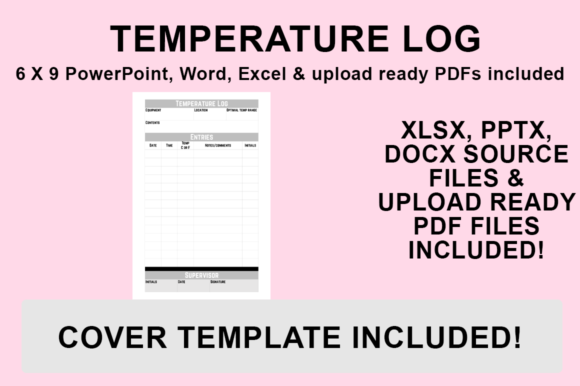
One of the most common reasons for KDP rejection or poor customer reviews is improper formatting. Margins that are too narrow result in text being cut off during binding, while incorrect bleed settings can ruin full-page graphics. The KDP Interior - Temperature Log is pre-configured for a 6″x9″ trim size with NO BLEED. This specification is critical for functional logbooks.
A no-bleed design is generally safer and more cost-effective for temperature logs. Since these books are primarily utilitarian, keeping all content within the safe zone ensures that writing space remains usable regardless of minor manufacturing variances. The 6″x9″ dimension is also the industry standard for portable logbooks, striking an optimal balance between writing surface area and portability. Whether intended for laboratory use, home brewing, gardening, or HVAC maintenance, this size fits comfortably in a lab coat pocket or field bag.
Furthermore, the templates are structured to account for gutter margins. When designing a logbook, the inner margin must be wider than the outer margin to accommodate the binding. Using these pre-sized files mitigates the risk of user error in this area, ensuring that the "Date," "Time," and "Temperature" columns remain legible and writable even near the spine. This attention to technical detail directly impacts the perceived quality of the finished paperback.
Customization Strategies for Market Differentiation
In a saturated marketplace, simply publishing a basic temperature log is rarely sufficient. The ability to edit the source files allows you to tailor the KDP Interior - Temperature Log to specific micro-niches. Professional observation suggests that specificity drives sales in the low-content category. A generic "Temperature Log" faces immense competition, whereas a "Refrigerator Safety Compliance Log for Restaurants" or "Homebrew Fermentation Tracker" targets a defined buyer intent.
Because you have access to the original design files, you can implement several differentiation strategies:
- Niche-Specific Headers: Replace generic titles with terminology relevant to your target audience. Changing "Notes" to "Corrective Actions Taken" instantly makes the log more valuable to food safety inspectors or facility managers.
- Branding Integration: Add space for company logos, inspector signatures, or certification stamps. For B2B applications, this transforms a simple notebook into a compliance tool.
- Instructional Content: Utilize the first few pages to include reference charts, conversion tables (Celsius/Fahrenheit), or standard operating procedures. The PowerPoint and Word files make adding this front matter seamless.
- Visual Hierarchy: Adjust font weights and shading to guide the user’s eye. High-contrast headers improve usability in low-light environments like warehouses or cold storage facilities.
This level of customization not only improves the user experience but also enhances the long-term value of the asset. You are not purchasing a single-use product; you are acquiring a reusable framework for generating multiple related titles.
Exporting for KDP: Ensuring Upload Readiness
Even with perfectly formatted source files, the export process can introduce errors if not handled correctly. Converting your customized KDP Interior - Temperature Log to a print-ready PDF requires adherence to specific protocols to preserve layout integrity. The following workflow ensures your file meets Amazon’s ingestion standards.
Begin by opening your desired source file and completing all customizations. Verify that fonts are embedded or standardized to avoid substitution issues. Next, navigate to ‘File’ and select ‘Save As.’ Choose your destination folder and, crucially, select PDF (.pdf) from the ‘Save as type’ dropdown menu. Do not use “Print to PDF” or third-party converters unless necessary, as native export functions typically handle margin preservation and metadata embedding more reliably.
Before uploading, always validate the exported PDF using tools like Adobe Acrobat’s preflight checker or KDP’s own previewer. Check specifically for:
- Consistent page dimensions (exactly 6x9 inches).
- Absence of crop marks or printer marks (unless explicitly required).
- Text clarity at 100% zoom (no pixelation).
- Correct page count matching your metadata entry.
This validation step is non-negotiable. A corrupted upload can delay publication by days, and a poorly rendered interior leads to negative reviews that are difficult to recover from. Treating the export process with the same rigor as the design phase ensures professional results.
Practical Applications and Audience Fit
Determining whether the KDP Interior - Temperature Log fits your project depends on your specific goals and resources. This template package is exceptionally well-suited for self-publishers building a portfolio of functional journals, small businesses needing internal compliance documentation, and educators creating classroom science resources. The editable nature of the files supports both commercial publishing and private organizational use.
However, there are limitations to consider. Users unfamiliar with Microsoft Office may find the learning curve steep, particularly regarding master slides in PowerPoint or section breaks in Word. Additionally, because the files are designed for digital editing, they do not include physical paper stock recommendations or binding advice; those decisions remain the publisher's responsibility. The templates provide the digital skeleton, but the flesh of the product—marketing copy, cover design, and niche research—must still be supplied by the user.
For freelancers and virtual assistants offering KDP setup services, this asset represents a time-saving deliverable. Instead of billing clients for ten hours of table formatting, you can customize a professional-grade interior in under an hour, improving your effective hourly rate and client satisfaction. Similarly, bloggers and influencers in niches like homesteading or aquarium keeping can use these files to create branded merchandise that complements their content strategy.
Assessing Long-Term Value and Usability
When evaluating digital assets for publishing, sustainability matters. The KDP Interior - Temperature Log offers strong long-term value due to its platform-agnostic file formats. Unlike proprietary design software that may become obsolete or require expensive subscriptions, PowerPoint, Word, and Excel are ubiquitous standards. Files created today will likely remain editable and accessible for years, protecting your investment.
Usability extends beyond the initial creation phase. As KDP guidelines evolve or market preferences shift, the ability to update your interior without starting from zero is invaluable. Perhaps Amazon changes its safe zone requirements, or customers request a larger notes section. With source files, these adjustments are trivial. With static PDFs, they would necessitate a complete redesign.
Ultimately, this template package succeeds because it respects the user’s intelligence and time. It removes the tedious barrier of technical formatting while preserving the creative freedom necessary for market success. Whether you are launching your first low-content book or optimizing a backlist of compliance journals, the KDP Interior - Temperature Log provides a reliable, professional foundation. Its combination of technical accuracy, format versatility, and customization potential makes it a pragmatic choice for anyone serious about producing high-quality printed logbooks. By focusing on utility and ease of modification, it aligns with the core principles of helpful content creation: solving real problems for specific audiences through tangible, well-executed resources.