Streamlining Your Publishing Workflow with a 2021 Weekly Planner KDP Template
For independent publishers and content creators, the transition from concept to a live product on Amazon can be fraught with technical hurdles. Finding a reliable 2021 Weekly Planner KDP template is often the critical first step in establishing a low-content publishing business or creating personalized organizational tools. This specific resource is designed to bridge the gap between creative intent and technical compliance, offering a pre-formatted solution that has been rigorously tested on the KDP platform without errors. By utilizing a verified 8.5 x 11 no-bleed layout, creators can bypass the most common rejection reasons related to margin violations and gutter safety zones.
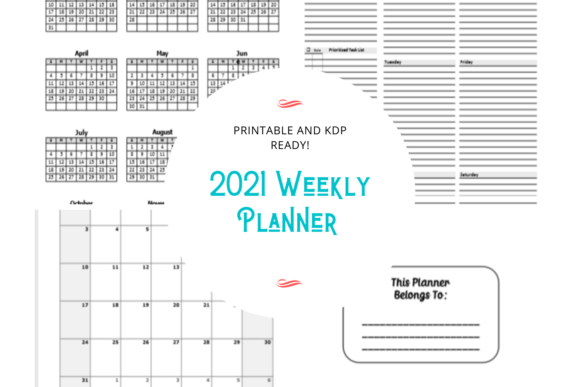
The primary value of this planner lies in its dual nature as both a finished product and an editable foundation. It addresses the immediate need for a compliant upload file while simultaneously serving as a customizable asset for those who wish to build a unique brand identity. With 87 pages of structured content and included PowerPoint source files, this template transforms what is typically a weeks-long design process into a manageable task that can be completed in an afternoon.
Overcoming Common Low-Content Publishing Challenges
Creating a planner from scratch involves more than just arranging boxes on a page. Adults entering the self-publishing space frequently encounter specific pain points that stall their progress. Understanding how a pre-tested 2021 Weekly Planner KDP file resolves these issues is essential for efficient production.
- Margins and Bleed Anxiety: The most frequent cause of KDP rejection is improper margins. Text or graphics extending too close to the trim line or the gutter (binding side) result in automatic flagging. This template utilizes a strict 8.5 x 11 no-bleed specification, ensuring all elements remain within safe zones.
- Calendar Accuracy: Manually inputting dates for a yearly calendar, twelve monthly spreads, and fifty-two weekly layouts invites human error. A single wrong date can render a planner useless. This resource provides pre-populated, accurate 2021 dating across all necessary views.
- Software Compatibility: Not every creator owns Adobe InDesign. By providing fully editable PowerPoint files, this planner lowers the barrier to entry, allowing users to modify fonts, colors, and branding using software they likely already possess.
- Cover Design Integration: Interior formatting is only half the battle. The inclusion of a back cover graphic ensures visual consistency and saves time on external design assets.
Strategic Customization for Brand Differentiation
While the template is upload-ready in its current state, the most successful publishers treat it as a starting point rather than a final destination. The "fully editable" aspect of the PowerPoint files allows for strategic differentiation in a saturated market. When approaching a 2021 Weekly Planner KDP project, consider how customization aligns with specific audience needs.
Niche Adaptation
A generic weekly planner appeals to everyone and no one. Use the editable source files to tailor the interior to a specific demographic. For example, a teacher might utilize the notes page for each month to track grading periods or curriculum milestones. A fitness enthusiast might repurpose the weekly spread to include meal prep sections or workout logs alongside standard appointments. Because the master slides and individual layouts are accessible, adding niche-specific headers or prompts takes minutes rather than hours.
Branding Consistency
Building a recognizable series requires consistent visual language. Users can replace default fonts with proprietary typefaces and adjust color palettes to match existing book covers or social media aesthetics. This level of control turns a functional utility item into a cohesive brand extension. The included back cover graphic serves as a baseline that can be modified to feature author bios, series listings, or QR codes linking to digital resources.
Practical Applications and User Scenarios
Different users will leverage this 2021 Weekly Planner KDP template to achieve distinct outcomes. Recognizing your specific use case helps maximize the return on investment for this resource.
The New Publisher: For those publishing their first low-content book, the priority is learning the platform mechanics. This template acts as a safe sandbox. Since it has been tested without errors, new publishers can upload it with confidence to understand the proofing process, keyword selection, and category placement without worrying about formatting rejections. It validates the workflow before investing time in original designs.
The Productivity Coach or Consultant: Professionals often require branded materials for clients or workshops. Rather than hiring a designer for a custom print run, consultants can edit the PowerPoint files to include their logo and methodology. They can then order author copies via KDP at printing cost, creating high-value handouts for seminars or coaching packages without minimum order quantities.
The Personal User: Some adults seek this resource not for profit, but for personal organization. The printable nature of the PDF means you do not have to publish to Amazon to benefit. You can print specific months or the entire year at home or through a local shop, binding it locally for a customized physical planner that fits exact preferences.
Implementation Best Practices
To ensure the best possible outcome when using this 87-page template, follow these implementation guidelines. Even with a pre-tested file, user modifications can introduce new variables.
- Verify After Editing: If you alter margins, add heavy graphics, or change font sizes significantly, always run the modified PDF through the KDP Previewer tool again. The "tested without errors" status applies to the base file; substantial changes require re-validation.
- Respect the Gutter: When adding content to the inner margins, maintain adequate white space. An 8.5 x 11 no-bleed book relies on sufficient gutter allowance to prevent text from disappearing into the binding as page count increases.
- Optimize File Size: While PowerPoint is excellent for editing, exported PDFs can sometimes be larger than necessary. Use PDF optimization tools to reduce file size without sacrificing print quality, ensuring faster uploads and processing times.
- Leverage the Monthly Notes: The dedicated notes page for each month is a high-value feature. Ensure this space remains prominent during customization, as many users specifically seek planners that offer reflection or planning space separate from the daily grid.
Maximizing Utility Beyond the Upload
The true strength of this 2021 Weekly Planner KDP resource is its flexibility. It solves the immediate technical problem of KDP compliance while providing the creative freedom necessary for long-term success. Whether you are building a publishing portfolio, creating client resources, or organizing your own life, the combination of a verified PDF and editable PowerPoint source files offers a practical pathway to your goals.
By focusing on how this template facilitates your specific objectives—rather than viewing it merely as a collection of pages—you transform a simple digital download into a scalable asset. The 87-page structure provides comprehensive coverage for the entire year, but your strategic input determines its ultimate value. Approach the editing process with intention, respect the technical parameters of the platform, and utilize the provided assets to create a planner that truly serves its intended audience.