KDP Interior Nanny Log: Custom 6x9 Templates
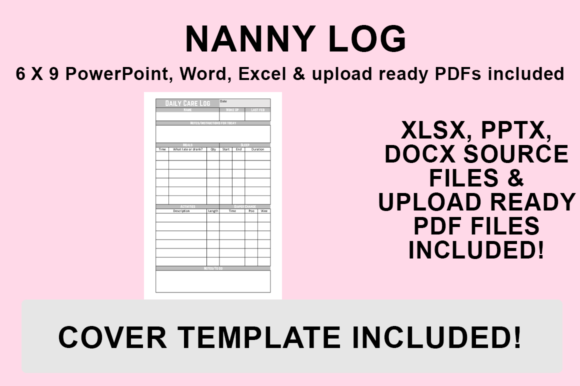
Creating a successful low-content book on Amazon KDP requires more than just uploading a generic template; it demands a product that solves a specific problem with clarity and style. The KDP Interior - Nanny Log is designed specifically for caregivers, parents, and agencies who need reliable daily tracking without the clutter of overly complex planners. This interior balances functional data entry with aesthetic appeal, ensuring that the log feels like a professional tool rather than a chore. Because this resource is built using editable PowerPoint, Word, and Excel source files, you are not locked into a static design. You have the freedom to adjust the layout, modify tracking fields, and customize the visual identity to match your specific brand or niche audience.
Visual Personality and Functional Design Appeal
The visual character of this nanny log leans toward clean, modern typography and structured layouts that prioritize readability over decoration. In the context of editorial design and publishing, this approach is critical. Caregivers often fill out these logs in low-light conditions or during brief transitions between activities, so high contrast and clear hierarchy are non-negotiable. The included templates utilize premium font choices that strike a balance between warmth and professionalism. A sans serif font is typically used for headers and data labels to ensure instant legibility, while a softer script font or handwritten font might be introduced sparingly for section titles to add a personal, human touch.
This duality in typeface selection influences how the end-user perceives the product. A purely clinical log can feel cold and institutional, while an overly decorative one can seem impractical. By providing editable source files, this KDP Interior allows you to test different font pairings to find the exact emotional resonance your target market needs. Whether you are aiming for a minimalist Scandinavian aesthetic or a colorful, playful vibe for infant care, the foundational layout supports these stylistic pivots without sacrificing usability. The 6″x9″ trim size is intentionally chosen as the industry standard for portable logs, offering ample writing space while remaining compact enough to fit in a diaper bag or tote.
Strategic Font Selection for Readability and Brand Identity
Typography does more than display text; it establishes trust and guides the user experience. When customizing your Nanny Log, consider how your font choices impact brand perception and consistency. If you are building a series of childcare resources, maintaining a consistent typeface across your KDP interiors creates immediate recognition. For example, using a specific modern typography style for all your headers signals to buyers that they are purchasing from a cohesive brand identity rather than a random assortment of files.
Readability should always dictate your final choice. While a creative font might look stunning in a logo design or social media graphics, it may fail in a functional table where users need to quickly scan meal times or nap durations. Evaluate your project fit by printing test pages at actual size before finalizing your PDF. Check if the line weight is too thin for standard home printers, as many KDP customers print these logs at home for immediate use. Additionally, review commercial licensing for any new fonts you introduce. The base files come ready to use, but if you swap in a new display font or serif font to differentiate your product, ensure you have the appropriate rights for commercial publishing.
Customization Workflow Across Multiple Platforms
Versatility is the primary advantage of receiving source files in three distinct formats. Different creators have different workflows, and this package accommodates all of them. Microsoft Word is ideal for text-heavy modifications or simple layout adjustments, making it accessible for publishers who may not be professional designers. Excel serves those who want to manipulate data tables, adjust column widths mathematically, or create automated date formulas before exporting. PowerPoint offers the most graphical flexibility, functioning similarly to professional design software for arranging elements, adding custom icons, or integrating unique background textures.
This multi-format approach empowers entrepreneurs and content creators to put their own stamp on the product without needing to hire a graphic designer. You can easily add your logo, change color schemes to match your website, or insert additional pages for specific tracking needs like medication administration or developmental milestones. The ability to edit these design assets directly transforms a standard commodity into a specialized product. For marketers and bloggers in the parenting niche, this means you can create a lead magnet or a paid digital download that aligns perfectly with your existing content strategy and visual language.
Exporting Print-Ready PDFs for Seamless KDP Upload
The technical quality of your upload determines whether your book passes Amazon’s review process and prints correctly. All included files are pre-sized to 6″x9″ with no bleed, which simplifies the setup for beginners. However, proper export settings are essential to preserve your formatting and ensure crisp text reproduction. Follow this precise workflow to generate a compliant file:
- Open your desired source file (PowerPoint, Word, or Excel) and finalize all customizations, including font embedding, margin checks, and graphic placement.
- Navigate to the ‘File’ menu and select ‘Save As’ rather than ‘Export’ to access the full range of format options.
- Choose your destination folder and name your file clearly to distinguish it from working drafts.
- From the ‘Save as type’ dropdown menu, strictly select PDF (.pdf). Avoid PDF/A or other archival formats unless specifically required, as standard PDF preserves interactive elements and color profiles best for KDP.
- Click Save and immediately open the resulting PDF to verify that no fonts were substituted and that margins remain intact.
This method ensures that your custom styling, premium font choices, and layout adjustments are flattened into a stable document. It eliminates the risk of formatting shifts that often occur when uploading native Word or PowerPoint files directly to KDP. By controlling the PDF generation locally, you maintain total authority over the final output quality.
Maximizing Commercial Value Through Personalization
In the saturated low-content book market, differentiation drives sales. Simply listing a generic nanny log is rarely enough to capture sustained attention. The true value of this KDP Interior lies in its adaptability. Consider creating niche-specific variations using the same base template. A log designed for newborns might emphasize feeding intervals and sleep tracking, utilizing a soft pastel palette and rounded sans serif fonts. Conversely, a log for after-school care might focus on homework completion and behavioral notes, employing a bolder, more energetic color scheme and sturdy slab serif typography.
These distinctions matter because they signal relevance to the buyer. When a parent searches for "toddler daycare tracker," they are looking for specific terminology and age-appropriate layouts. By leveraging the editable nature of these files, you can rapidly prototype and publish targeted versions that speak directly to micro-audiences. Furthermore, the inclusion of a print-ready PDF allows you to sell the digital version on platforms like Etsy or Gumroad alongside your physical KDP book, creating multiple revenue streams from a single set of design assets.
Ultimately, successful publishing is about solving problems with intention. This Nanny Log template provides the structural foundation, but your creative input provides the soul. Whether you are a seasoned publisher expanding your catalog or a crafter launching your first digital product, the combination of professional formatting and complete editability positions you to create something genuinely useful. Take the time to refine the typography, test the usability, and align the visual style with your brand. The result will be a product that stands out not just for how it looks, but for how well it serves the people who rely on it every day.